Every kitchen runs on tickets. For decades that meant a thermal printer and a rail. Today many kitchens use a screen instead, and plenty use both. Neither is right for every restaurant, so here’s an honest look at what each does well and how to decide.
What a kitchen display system is
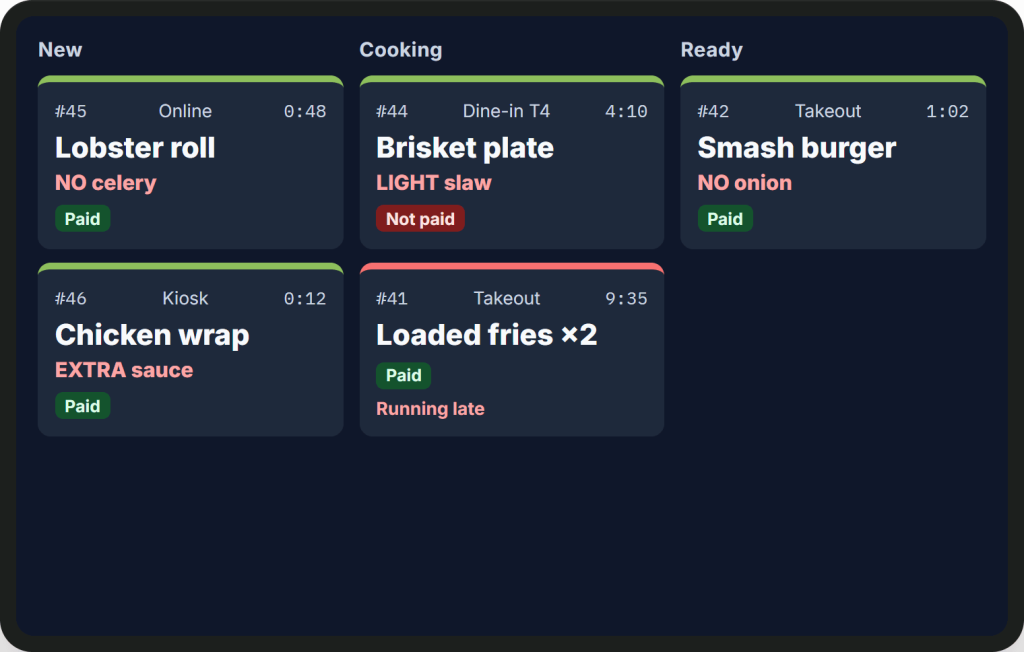
A kitchen display system (KDS) shows orders on a screen in the kitchen instead of printing them. Cooks tap or “bump” a ticket when it’s done. Because the screen knows when each order arrived and when it was finished, it can show timers, sort tickets by station and keep a record of how long the kitchen takes.
Printed tickets: what they do well
- Everyone already knows them. No training, and they work the same in every kitchen.
- They travel. A ticket can go with the plate to the pass or be stuck to a takeout bag.
- Low cost to start. A kitchen printer is cheaper than a mounted screen.
The downsides show up on busy nights: paper gets lost, splattered or read wrong; there’s no timer, so a ticket that has waited 20 minutes looks the same as one that arrived a minute ago; changes after the order is sent need a second ticket; and you get no record of ticket times to learn from.
Kitchen screens: what they do well
- Timers on every ticket, so a late order stands out before the guest notices.
- Tickets by station. The grill sees grill items, the fryer sees fryer items, and the expo sees the whole order.
- Changes that can’t be missed. “NO onions” in red on the screen is harder to miss than a line in small print.
- Recall. A ticket bumped too soon can be brought back with a tap.
- Paid or not paid. The kitchen can see whether an order is paid before it’s cooked.
- Less paper and fewer printer jams on the busiest night of the week.
The trade-offs: a screen needs a spot where every cook can see it, a mount that handles heat and grease, and a few shifts for the team to get used to bumping tickets.
How to decide
| Your kitchen | A good fit |
|---|---|
| One cook, short menu, low volume | A printer is usually enough |
| Several stations (grill, fryer, cold) | Screens by station |
| Lots of takeout and delivery-app orders | A screen, plus a printer for bag labels or receipts |
| Busy dine-in with courses | Screens, so held and fired courses are clear |
| Not sure yet | Start with one screen at the busiest station and keep the printer |
You don’t have to choose once and for all. Many kitchens run a screen on the line and keep a printer for takeout, or move one station at a time.
Tips for a smooth switch
- Mount it at eye level where the cook already looks, away from the fryer’s spray.
- Use a big, plain layout. Large dish names and bold changes beat fitting more tickets on the screen.
- Run both for a week. Keep the printer on while the team learns to bump.
- Pick a sound the kitchen can hear over the hood fans, but that doesn’t drive anyone mad.
- Review ticket times weekly. Which dishes or hours are slow? That’s where to look first.
How Skillet does this for you
Skillet’s kitchen screen is part of Skillet POS and Skillet Complete, with as many kitchen screens as you need. It runs on any tablet or screen with a browser, or on the Skillet Kitchen app for Android. Use screens, paper or both.
- Tickets by station, oldest first, with a timer on every ticket.
- Build lists showing what goes into each dish in assembly order, with changes in red: NO onions, EXTRA cheese.
- Paid or not paid on every ticket. Kiosk orders only reach the kitchen once they’re paid.
- Delivery-app tickets show which app and the ready-by time.
- Bump, recall and auto-clear, plus new-ticket sounds: a bell, order-up or your own upload.
- Printers and the cash drawer through the print bridge on a restaurant PC, for kitchen tickets and receipts.
- Keeps working when the internet drops. Registers can send tickets straight to Skillet Kitchen screens over the restaurant’s own network.
Any tablet you already own can be a kitchen screen. Start a free trial, open “Set up this device” on the tablet, and choose Kitchen.