

Labour is usually a restaurant’s biggest controllable cost after food, and it’s the one that moves fastest. A schedule written on Thursday decides a good part of next week’s profit before a single order comes in. The goal isn’t the smallest possible team. It’s the right number of people at the right hours, so service holds up on Friday night and nobody is standing around on Tuesday at 3 pm.
Labour cost percentage, worked out properly
Labour cost % = total labour cost ÷ sales (before tax and tips) × 100
Total labour cost means everything you pay for people, not just hourly wages: salaried managers, employer payroll costs such as CPP and EI contributions, vacation pay and benefits. Leave those out and the number looks better than it is.
On its own, labour cost percentage is less useful than it looks: it’s best read together with food cost as prime cost. A restaurant that cooks from scratch may spend more on labour and less on food than one that buys prepared items, and both can be healthy.
Schedule to sales, hour by hour
Weekly totals hide the real problem. Most restaurants are over-staffed in a few quiet hours and short-staffed in a few busy ones, and the week averages out to something that looks fine. A better approach:
- Look at sales by hour and by day for the last four to six weeks. Note the patterns: the lunch rush, the 3–5 pm lull, the late Friday push.
- Set a sales-per-labour-hour target for each role. If one cook can comfortably handle $250 of sales an hour on your menu, an hour forecast at $750 needs about three.
- Build shifts around the peaks. Staggered starts and shorter shifts cover a two-hour rush better than everyone starting at 11.
- Plan for the known exceptions. Holidays, local events, patio weather and paydays all move sales.
- Compare the plan with what happened. Scheduled hours against actual punches, and forecast sales against real sales, every week.
Small habits that add up
- Watch early punch-ins and late punch-outs. Ten minutes either side of every shift is real money over a month.
- Cut by the clock, not by feel. Decide in advance what sales level by 8 pm means one server can go home.
- Cross-train. A prep cook who can work the pass, or a server who can run the counter, gives you options on quiet days.
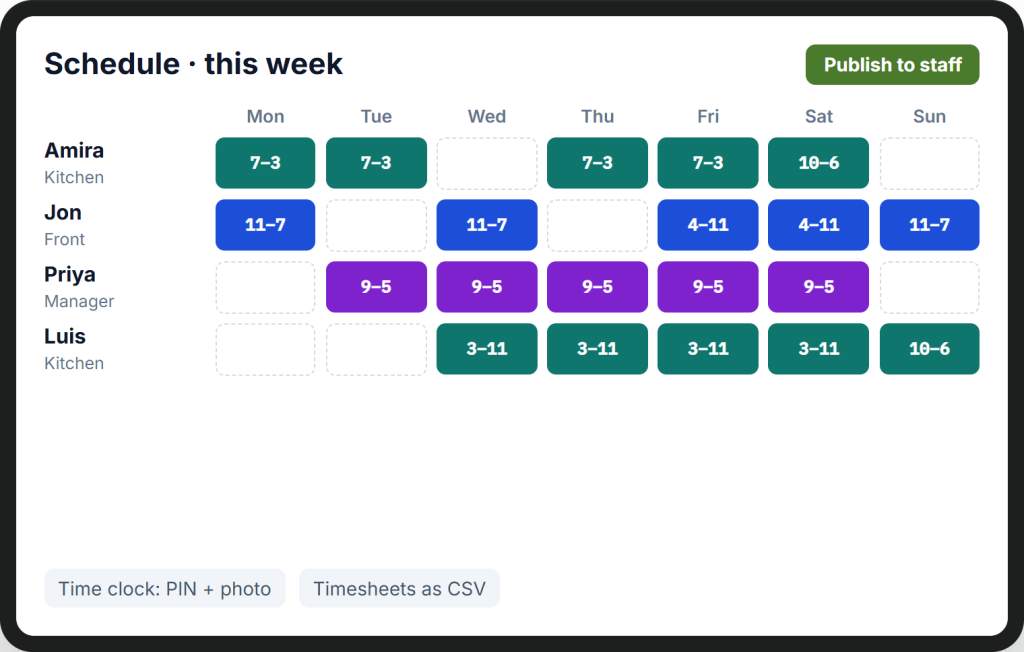
- Publish early. Staff who know their shifts a week or more ahead swap less and call in less.
- Keep tips separate from wages. Tip-outs and tip pools are part of what staff earn, but they come from guests, not from your labour budget. Track them clearly so everyone trusts the numbers.
How Skillet does this for you
Skillet keeps sales, the schedule and the time clock in the same place, so you can compare them without exporting three reports. Scheduling and the time clock are part of Skillet Insights and Skillet Complete.
- Schedule planner. Drag and drop shifts with presets, then publish to staff. Everyone has their own schedule page, so there’s no group chat of photos.
- PIN and photo time clock. Staff punch in on a register tablet with their PIN and a photo, so punches are their own.
- Timesheets for payroll. Hours with wages, exported as a CSV for your payroll provider.
- Tip sharing. Tip-outs and a tip pool by hours and role, saved by pay period.
- Prime cost every day. Labour against sales sits next to food cost on your dashboard, and the Monday email shows last week’s numbers and what to fix first.
- Roles and permissions. Manager, Kitchen and Front of house roles to start, each with their own access. Staff sign in with a PIN, no email needed.
Try Skillet free for 30 days: add your team, build next week’s schedule and see labour against sales from the first day. No card needed.