
Delivery apps can bring in orders you’d never see otherwise. They also take a commission on every one. If your app prices are the same as your in-store prices, some of those orders may cost you money to make.
What a delivery order really costs
Start with the plate, then add what’s different about delivery:
- The app’s commission. A percentage of the order. It varies by app and by the plan you’ve signed up for, so check your own agreement for the real number.
- Packaging. Containers, bags, sauces in cups, cutlery and napkins.
- Promotions you fund. Discounts and free delivery offers often come out of your payout.
- Refunds and adjustments. Missing items and complaints can be taken back from your payout after the fact.
A worked example
Take a $14.50 burger that costs $4.62 to make, with $0.34 of packaging. Suppose the app’s commission is 25% (an example only; use your own rate).
| Same price as in store | Marked up for the app | |
|---|---|---|
| App price | $14.50 | $17.99 |
| Commission (25%) | −$3.63 | −$4.50 |
| Food | −$4.62 | −$4.62 |
| Packaging | −$0.34 | −$0.34 |
| Left over | $5.91 | $8.53 |
In store, the same burger leaves $9.88 after food. At the same price on the app, it leaves $5.91 before labour and everything else. The markup closes most of that gap.
How to set app prices
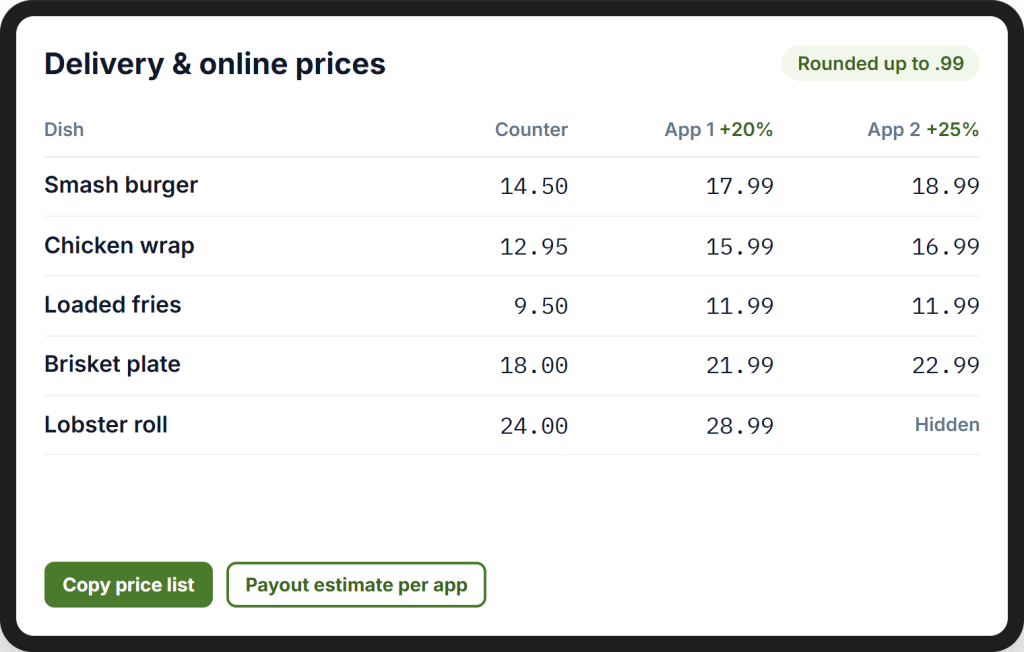
- Pick a markup for each app. Base it on that app’s commission. Many restaurants mark up between the in-store price and a price that fully covers the commission.
- Round up to a clean price. Ending in .99 keeps prices tidy and adds a little back to each dish.
- Check the dishes that travel badly. Some dishes don’t hold up in a box, or cost too much to package. Hide them on the apps rather than discount them.
- Set prices per app. Commissions differ, so one price for every app usually means one of them costs you more than it should.
- Keep your own ordering page cheaper. If you have commission-free online ordering, your in-store prices there give regulars a reason to order direct.
Check every payout
Pricing is half of it. The other half is making sure you’re paid what you should be. Compare each payout statement with your own orders: the commission charged, refunds taken back, and any orders that never appear. Small differences repeated over hundreds of orders add up.
Start with our food cost calculator to know your plate cost first.
How Skillet does this for you
- A price for each app. Choose a markup per app and Skillet rounds every dish up to .99. Set a fixed price for any dish, or hide dishes that travel badly. (Skillet Complete)
- A price list to copy into each app, so the apps always match what you decided.
- Delivery orders by app, alongside your own. Ring in Uber Eats, DoorDash and SkipTheDishes orders by app on the register, and the kitchen screen shows which app and the ready-by time. (Skillet Complete)
- Profit per dish after commission. See what each dish really leaves you on each app, next to what it makes in store. (Skillet Insights and Complete)
- Payout checks. Financials compare the apps’ payout statements with your orders and flag commission differences, refunds and missing orders. (Skillet Insights and Complete)
- Your own commission-free ordering page for pickup, with your link and QR code, so regulars can order direct. (Skillet Complete)
Try Skillet free for 30 days and set up your app prices from your own menu. No card needed.